
Freelancer Plan Setup and Plan-Fit Decisions: The Complete Guide

Last updated: November 19, 2026
Freelancer plan setup and plan-fit decisions matter because the right freelancer plan is the one that covers your real bottleneck without paying for extras you won’t use. Quick Answer: most freelancers should start with the lowest plan that fixes invoicing, reminders, or workflow gaps, then review it every 3 months. This guide to Freelancer plan setup and plan-fit decisions — The Complete Guide settles how to choose, set up, and switch plans without guessing.
Key Takeaways
- Start with your bottleneck: leads, admin, delivery, or cash timing.
- Pick a plan for the next 90 days, not for the freelancer you hope to become.
- A cheaper plan can cost more if it blocks invoicing, contracts, or time tracking.
- A bigger plan can waste money if you only need one tool and a clean workflow.
- The best fit can change when client volume, payment delays, or team size changes.
What actually determines the right freelancer plan?
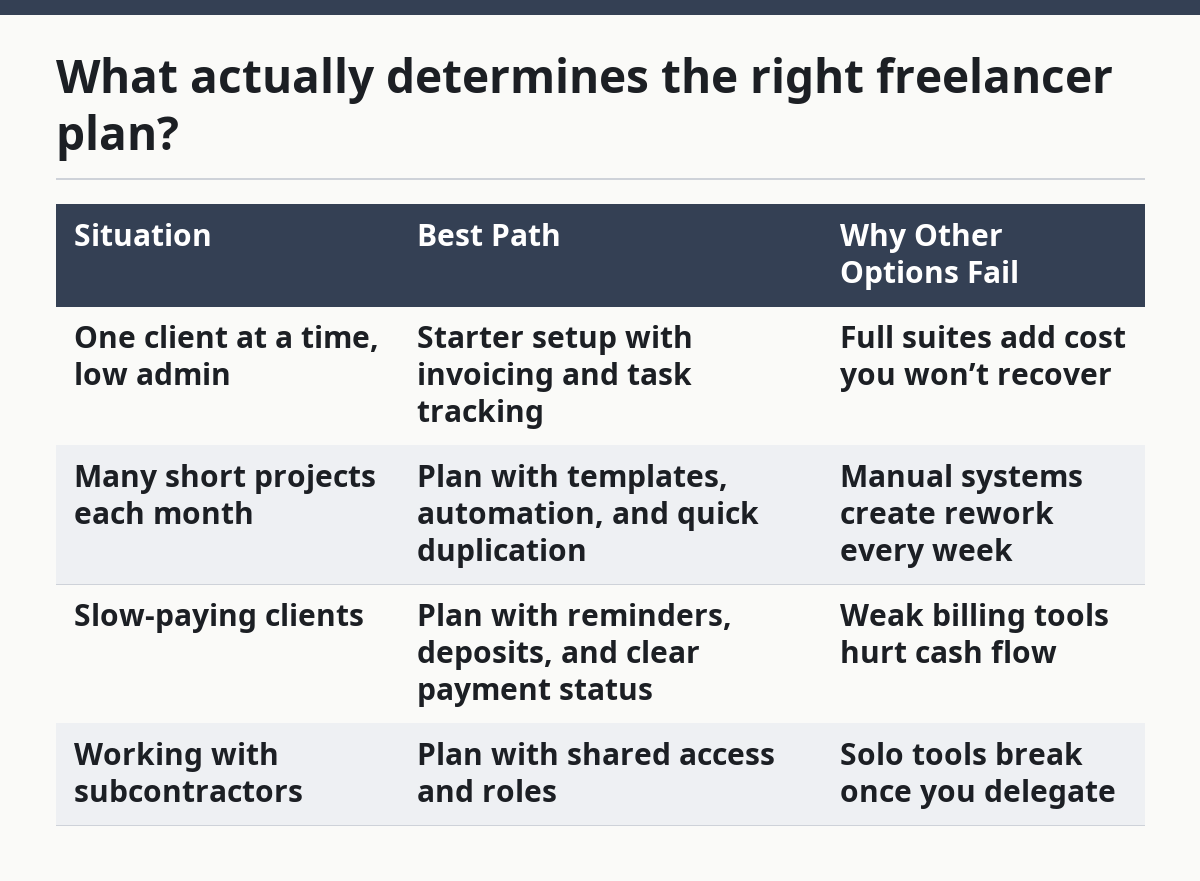
The right freelancer plan depends on four things: how you get paid, how often you switch clients, how much admin you hate, and whether you work alone or with subcontractors. If those facts are clear, the plan choice gets a lot easier.
Picture this: you’re staring at three plan tiers, one promise of “all-in-one,” and a monthly bill you don’t want to regret. The answer is not the flashiest tier. It’s the one that fits your monthly invoices, your contracts, and the tools you already trust.
Freelancer plan setup and plan-fit decisions usually go wrong when freelancers buy for their future workload, not their current one. That usually means paying for lead tools before the pipeline exists, or choosing a bare-bones setup and then patching holes with three extra apps.
Use this simple filter:
- Income flow: If clients pay irregularly, you need invoicing, reminders, and a buffer for recurring fees.
- Work pattern: If you juggle many short jobs, you need faster project setup and file handling.
- Admin load: If you lose time to follow-ups, choose a plan with automation before you buy more storage.
- Team shape: If you send work to editors, designers, or VAs, shared access matters more than templates.
A common mistake is to ask, “Which plan is best?” That question is too broad. Ask, “What single task do I need this plan to solve in the next 30 to 90 days?” That question gives you a usable answer.
| Situation | Best Path | Why Other Options Fail |
|---|---|---|
| One client at a time, low admin | Starter setup with invoicing and task tracking | Full suites add cost you won’t recover |
| Many short projects each month | Plan with templates, automation, and quick duplication | Manual systems create rework every week |
| Slow-paying clients | Plan with reminders, deposits, and clear payment status | Weak billing tools hurt cash flow |
| Working with subcontractors | Plan with shared access and roles | Solo tools break once you delegate |
- Write down your top three monthly tasks: getting work, doing work, getting paid.
- Mark the one that wastes the most time today.
- List the tools you already have, like PayPal, Stripe, Google Drive, Notion, or Harvest.
- Check whether the plan includes the missing piece or just repeats what you already own.
- Choose the lowest tier that removes the bottleneck for the next quarter.
Quick check: if your current pain is not obvious in one sentence, you are not ready to choose a plan yet.
How do I set up a freelancer plan without overbuying?
You set up a freelancer plan by building the workflow first and buying the plan second. If you buy first, you usually end up with unused features, duplicated apps, and a monthly bill that feels too high after the first week.
Picture this: you’ve signed up, the dashboard is open, and you’re tempted to click every feature labeled “premium.” That’s the trap. The better move is to map your work from first contact to final payment, then turn on only the steps you need.
Freelancer plan setup and plan-fit decisions stay cleaner when you start with the job stages, then match software to each one.
Here’s the setup order that keeps the mess down:
- Define the job stages. For example: lead, discovery call, quote, contract, draft, revision, invoice, paid.
- Choose one home base. Use one place for projects and notes, such as Notion, Trello, ClickUp, Asana, or Airtable.
- Set naming rules. A simple pattern like ClientName_Project_Date keeps files searchable.
- Connect payments. Link Stripe, PayPal, Wise, or your bank transfer method.
- Turn on reminders. Set invoice nudges at 3, 7, and 14 days after due date if your system allows it.
- Create two templates. One for repeat proposals, one for repeat delivery tasks.
- Test one full client cycle. Run a mock or low-risk project through the whole path before adding more complexity.
The truth is, setup problems show up later as lost hours. A freelancer who spends 15 minutes building the right template saves that time every single time the same job repeats.
Avoid these setup mistakes:
- Turning on every automation at once
- Mixing personal and client work in the same board
- Using a “general” inbox for contracts and payments
- Building a perfect system before a single project starts
- Choosing a plan because it has more storage, not more utility
If your work is simple, a clean spreadsheet plus invoicing tool may be enough. If your work involves revisions, approvals, and repeat handoffs, you need structure from day one.
For a closer fit check, compare setup choices against guidance from SBA and IRS self-employed tax resources. Quick check: if you can’t describe your workflow in 7 steps or fewer, your setup is too vague to support a plan decision.
Which plan features matter most for freelancers?
The features that matter most are the ones tied to revenue, time, and handoff speed. A feature that looks impressive but doesn’t shorten work or speed payment is decoration.
Picture this: you’re comparing tiers and one plan advertises “advanced collaboration,” while another has “client portal.” The better choice depends on whether you need clients to approve work in one place or just view invoices and files. The label matters less than the actual job it does.
Freelancer plan setup and plan-fit decisions usually come down to a few core features, not the longest feature list.
The features that usually deserve priority are:
- Invoicing and reminders if you chase late payment
- Time tracking if you bill hourly or need proof of effort
- Contract and proposal templates if you repeat similar jobs
- Client portals if clients ask for status updates all the time
- File version control if revisions get messy
- Automation if you repeat the same admin steps every week
- Role-based access if you hand tasks to others
For many freelancers, the best starting point is a plan that handles billing plus one workflow tool. If you are choosing between a narrow tool and a broad suite, this is where you compare what you will actually use. On the other hand, if you do retainers, project management, and subcontracting in the same month, the broader plan may save real time.
One strong way to think about it: every feature should earn its place in either money saved or hours saved. If it does neither, skip it.
Some real tools that often show up in freelancer setups include FreshBooks, QuickBooks Self-Employed, Harvest, Dubsado, Bonsai, Notion, Trello, ClickUp, and Airtable. None of those is automatically right. The right pick depends on whether you want billing first, operations first, or a combined client flow.
According to FreshBooks, QuickBooks, and Harvest, the same basic freelancer tasks can be handled in different ways depending on invoicing, tracking, and project needs. A simple test: if removing a feature would not change your weekly routine, you probably don’t need that feature.
Quick check: if one feature directly affects getting paid or shipping work faster, it matters; if not, it’s probably noise.
What should I do if I’m a solo freelancer with irregular income?
If your income changes from month to month, you should choose a low fixed cost and strong payment control. That means keeping subscriptions lean and making sure your plan helps you bill fast, track due dates, and avoid surprise renewals.
Picture this: one month is packed, the next month is thin, and your software bill lands the same day every time. That setup can work, but only if the plan is cheap enough to survive slow months and useful enough to speed up the busy ones.
Your freelancer plan setup should focus on cash protection:
- Use a plan with monthly billing if you don’t want to commit to a year too early.
- Pick invoicing tools that support deposits and payment reminders.
- Keep storage modest unless you send large media files.
- Avoid expensive add-ons until your average monthly income is steady for at least 3 months.
- Save a backup export of client and invoice data each month.
If you bill per project, a tool like Bonsai or Dubsado may help because the workflow sits around proposals, contracts, and invoices. If you mainly need clean invoices and expense tracking, QuickBooks Self-Employed or FreshBooks can be enough. The point is not brand loyalty. The point is reducing admin that steals paid hours.
Here’s the part people miss: low income does not always mean the cheapest plan. If a slightly higher tier prevents one missed invoice or one late payment, it can pay for itself quickly, but you should check the fit against your actual workflow and consult a qualified professional if you are unsure. If the tier only adds nice-looking dashboards, walk away.
- List your last 6 months of income, even roughly.
- Find the slowest month and set that as your risk floor.
- Choose the smallest plan that still sends invoices and reminders.
- Turn off annual billing unless you already know the tool saves time every week.
- Review the plan after 2 billing cycles, not after 2 days.
Quick check: if a $20 or $30 monthly fee would feel painful in a slow month, you need a tighter plan, not a fancier one.
When is a higher-tier freelancer plan worth it?
A higher-tier plan is worth it when it removes repeated manual work or lets you handle more clients without chaos. If you are still small but already repeat the same steps every week, the upgrade can be sensible. If not, it is just a prettier bill.
Picture this: you’re copying the same proposal, the same contract, and the same invoice every week. At that point, a tier with templates, automation, or client portals can be cheaper than your time. The key is measuring friction, not chasing status.
Use this decision rule:
- Upgrade if you spend 30 minutes or more per client on repeated admin.
- Upgrade if you need approval trails for edits, sign-off, or compliance.
- Upgrade if you have subcontractors who need controlled access.
- Upgrade if the lower tier blocks payment methods you actually use.
- Stay put if the extra features are for a future phase you haven’t reached.
Now, you might be wondering whether “premium” always means better. It often does not. A higher tier can add storage, custom branding, automation limits, or team seats. If those extras don’t map to a real pain point, they do nothing for you.
The best upgrade case is often a freelancer who has stable demand and repeated workflows. A copywriter with five retainers, a designer with recurring revisions, or a video editor managing review rounds can justify more structure. A brand-new freelancer with one or two clients usually cannot.
The hard truth: if you don’t know exactly which feature you’re buying and why, you are buying comfort, not utility.
Quick check: if one missing feature forces you into repeated copy-paste work, a higher tier may be justified; if not, stay on the simpler setup.
What are the edge cases that break normal plan advice?
The normal advice breaks when your business shape is unusual, your clients are not standard, or your work has compliance or handoff pressure. In those cases, the “cheapest” plan can fail fast.
Picture this: you’re not a one-client-at-a-time freelancer. Maybe you do retainers, batch work, international billing, or subcontracted delivery. The usual advice to “start small” still matters, but the details shift hard.
Here are the cases that change the answer:
- You bill in multiple currencies. What changes: exchange fees and payment method support matter more than templates. What to do instead: pick a plan or tool that supports the currencies you use most, and check whether Wise, Stripe, or your invoicing software handles conversion cleanly.
- You do regulated work. What changes: document trails and access control matter more than pretty dashboards. What to do instead: choose software with clear permissions, audit logs, and export options.
- You manage subcontractors. What changes: shared task ownership matters more than solo time tracking. What to do instead: choose a plan with seats or collaborators, not just a single-user license.
- You handle lots of revisions. What changes: version control matters more than a polished client portal. What to do instead: use one system for drafts and approvals so you can trace changes.
- You work with retainers. What changes: recurring invoices and scope tracking matter more than one-off project templates. What to do instead: choose a plan that makes repeat billing simple.
- You rely on phone-based admin. What changes: mobile access matters more than desktop depth. What to do instead: make sure the app can handle invoices, notes, and client replies on mobile without a desktop detour.
If your work fits one of these cases, generic “starter” advice can mislead you. The right plan often sits one step above the cheapest tier because the cost of failure is higher than the monthly fee.
A good filter here is simple: ask what breaks first if the plan is too small. If the answer is payment, compliance, or client handoff, don’t bargain hunt. If the answer is only a bit more clicking, keep the setup simple.
Quick check: if your work has a second person, a second currency, or a second approval layer, you are in edge-case territory.
How do I know when to switch plans or tools?
You should switch when the current plan causes repeat friction for 2 straight months or when your workflow has changed in a way the plan cannot support. If the problem is one bad week, wait. If the problem is structural, move.
Picture this: you’ve outgrown your setup, but you’re not sure if the pain is real or just a busy month. That’s where people hesitate too long. The sign to move is not annoyance. It’s repeated waste.
Switch if you see any of these patterns:
- You export data because the built-in tools stop at the wrong place.
- You pay for two apps to do one job because the plan is too thin.
- You miss invoices, approvals, or deadlines because the workflow is scattered.
- You’re adding subcontractors, but the tool only works well for one user.
- You spend more time managing the software than doing the client work.
Before switching, make a short migration list:
- Export contacts, projects, invoices, and files.
- Confirm the new tool supports your key data fields.
- Move one active client first, not your whole history.
- Run both systems in parallel for 1 billing cycle if payment timing matters.
- Check that recurring invoices, reminders, and templates still work after the move.
A lot of freelancers wait for a perfect reason to switch. You do not need one. You need a clear mismatch between the plan and the work.
On the flip side, do not switch just because a new tool is trending on social media or because one feature sounds nicer. A new dashboard rarely fixes a bad process.
Quick check: if the same limitation keeps costing you time or money every month, the plan is wrong; if the issue is temporary, stay put.
What does a clean freelancer plan setup look like in practice?
A clean setup keeps the number of moving parts small and the payment path obvious. If you can explain your workflow in a minute, you’re close. If you need five tabs and a spreadsheet to explain where the money goes, the setup is still bloated.
Picture this: a new lead lands, the quote goes out, the contract gets signed, work starts, the invoice sends, and payment arrives without extra chasing. That’s the shape you want. Simple, not flashy. Just reliable.
A practical freelancer plan setup often looks like this:
- One home base for projects: Notion, Trello, ClickUp, or Asana
- One billing path: FreshBooks, QuickBooks, Dubsado, or Bonsai
- One file system: Google Drive, Dropbox, or OneDrive
- One payment method: Stripe, PayPal, Wise, or bank transfer
- One calendar: Google Calendar or Outlook Calendar
The point is not to use the fewest tools at all costs. The point is to avoid duplicate roles. If two tools do the same thing, one of them is probably wasting your time.
For many freelancers, the best version is a simple stack with one app for admin and one app for money. Anything beyond that should solve a visible problem, not a hypothetical one.
If you want a fast reality check, ask three questions:
- Can I send a quote in under 10 minutes?
- Can I invoice without copying data by hand?
- Can I see what is unpaid at a glance?
If the answer is no, the setup needs work. If the answer is yes, you are close to a good-fit plan.
Quick check: if your current workflow is easy to repeat and hard to mess up, the plan is probably close to right.
FAQ
What is the first thing I should choose in a freelancer plan setup?
You should choose the payment path first. If invoicing, reminders, or deposits are broken, the rest of the plan won’t save time. Start with how money moves, then fit the project and file tools around that.
Should I pay yearly or monthly for a freelancer plan?
Monthly is safer if your income is uneven or you are still changing tools often. Yearly can make sense only when you already know the tool fits your workflow and you expect to use it for at least 12 months.
Do I need an all-in-one freelancer platform?
No, not if separate tools already cover your main tasks well. An all-in-one platform helps when you want fewer logins and one client flow, but it can also force you to pay for parts you never use.
When is the cheapest plan the wrong choice?
The cheapest plan is wrong when it blocks billing, team access, or version control. If you lose paid time because of missing features, the lowest price is not the lowest cost.
How often should I review my plan-fit?
Review it every 3 months or after a clear change in client volume, payment delays, or team size. If the same friction keeps showing up, the plan needs adjustment.
Drafted with AI; not yet reviewed by a person.